> For the complete documentation index, see [llms.txt](https://data-champions.renew-platforms.dk/renew-data-champions/llms.txt). Markdown versions of documentation pages are available by appending `.md` to page URLs; this page is available as [Markdown](https://data-champions.renew-platforms.dk/renew-data-champions/research-data-management/data-life-cycle/collect-and-create-stage.md).
# Collect & Create Stage
Collect & Create Stage
Collect & Create Stage
## **Collect & Create Stage — Detailed Summary Table**
| **Category** | **Details & Actionable Guidance (UCPH · reNEW · EU funders)** |
| ---------------------------------------------- | ------------------------------------------------------------------------------------------------------------------------------------------------------------------------------------------------------------------------------------------------------------------------------------------------ |
| **Stage Purpose** | Actively generate, gather, or receive data and documents while ensuring outputs are organized, secure, documented, and reusable from day one. |
| **Triggers & Timing** | Project start; first data acquisition; first instrument run; receipt of third‑party/clinical data; new collaborator/site added; **immediately** if a project is already underway but lacks structure. |
| **Scope (What’s in)** | Raw data, processed/derived datasets, lab protocols, code/pipelines, instrument logs, readme/data dictionary, consent forms/DUAs (if applicable), and any externally supplied datasets. |
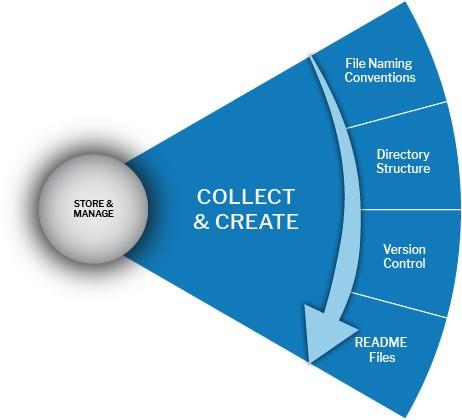
| **Directory Structure (Foundational)** | Establish a standard hierarchy at the outset. Example (project root):`/project_name/ 01_raw/ 02_intermediate/ 03_processed/ 04_analysis/ 05_docs/ 06_metadata/ 07_code/ 08_reports/ 09_sharing/`Use leading numbers to enforce order and one structure across all sites in reNEW collaborations. |
| **File Naming Conventions** | Use descriptive, deterministic names: `____.`.Do: `20250731_wgs_S123_align_v01.bam`Do: `20250731_mic_ROI45_raw_v01.tif`Avoid: spaces/special chars; use `_` or `-`; include version and date; keep ≤ 32–50 chars when possible. |
| **Metadata & Documentation (Minimum Set)** | Maintain a README per folder; a data dictionary per dataset (variables, units, ranges, missing codes); acquisition metadata (instrument, software, version, parameters); provenance (who/when/how). Store in `06_metadata/` and alongside data. |
| **Templates & Starter Kits** | Provide team‑wide templates: `README_template.md`, `data_dictionary_template.csv`, `folder_structure.json`, `naming_convention.md`, and a project setup checklist. Keep in a shared reNEW template registry. |
| **Data Quality & Validation** | Define QC gates at ingest: file integrity (**checksums**), schema/format validation (CSV delimiters, header checks), range checks, minimal completeness (required columns/metadata). Record QC outcomes in `qc_log.csv`. |
| **Storage & Access (UCPH/reNEW)** | Store working data on approved services: ERDA, high‑security storage for sensitive data, or managed SharePoint/Teams for collaborative docs. Configure automatic daily snapshots and off‑site backup (3‑2‑1 principle, where feasible). |
| **Security & GDPR** | For personal/clinical/confidential data: apply least‑privilege access, encrypt at rest/in transit, keep consent/DP in `05_docs/ethics/`, and maintain a data‑handling record. Pseudonymize at collection where possible; separate identifiers from research data. |
| **Formats & Interoperability** | Prefer open, analysis‑friendly formats (CSV/TSV, JSON, TIFF, HDF5). If proprietary formats are unavoidable during collection, document the exact software/versions used and plan conversion steps to open the formats at the earliest safe point. |
| **Versioning & Provenance** | Distinguish **raw vs processed** (`01_raw/` vs `03_processed/`). Use **semantic or incremental versions** (`v01`, `v02`), or tag releases in Git for code/pipelines. Record transformations (script name, parameters, input→output mapping) in `provenance_log.md`. |
| **Collaboration Practices** | Centralize shared conventions; publish the structure & naming in the project README. Use controlled shared spaces (ERDA/SharePoint) with clear write/read roles. Schedule periodic structure audits (bi‑weekly in the early project). |
| **Automation & Tooling** | Provide small utilities: `create_project_skeleton.sh`, `new_experiment.py` (auto‑stamps folders/files), `validate_dataset.py` (schema/QC checks), and `checksum_all.sh`. Run pre‑commit hooks to prevent non‑compliant names. |
| **Compliance & Reporting (EU/Horizon Europe)** | Maintain a living DMP (update when collection methods, collaborators, or data risks change). Track funder IDs/grants in metadata; ensure traceability from raw → published dataset for reproducibility and audits. |
| **Roles & Responsibilities** | PI: approves structure/naming, ensures resources/compliance. Data Steward/Manager: owns templates, QC, training, and audits. Researchers/Analysts: apply conventions, complete metadata/QC logs—IT: storage, access control, backups, monitoring. |
| **Quick Wins (Week 1–2)** | 1) Adopt the standard folder schema. 2) Publish naming convention and README templates. 3) Turn on backups/snapshots. 4) Implement checksum/QC on ingest. 5) Hold a 30‑minute training for the team. |
| **KPIs / Health Checks** | % files compliant with naming; % datasets with README & data dictionary; time‑to‑locate file (target ≤ 1 min); % folders passing QC; # of restore tests per quarter; # of GDPR events (target 0). |
| **Risks & Mitigations** | Drift from conventions → monthly audits & automated validators. Loss/corruption → tested restores, 3‑2‑1 backup. GDPR breach → encryption, access logs, steward sign‑off. Tool lock‑in → early open‑format exports + format notes. |
| **Deliverables (Outputs)** | Standardized folder tree, naming guide, README/data dictionary, QC logs, provenance records, and access controls documented—ensuring every file is clearly labeled, traceable, and ready for downstream analysis/sharing. |